
Home > Syndicatebank > Syndicate bank net banking
Syndicate bank users can login directly to netbanking. Syndicate Bank Internet Banking support Browsers like chrome, internet explorer and firefox that support 128-bit encryption to access NetBanking.

Customers need to be carefully check the url of syndicate login screen, https://www.syndonline.in will appear with secured lock mark to prevent fraudulent sites. (highlighted in red box)
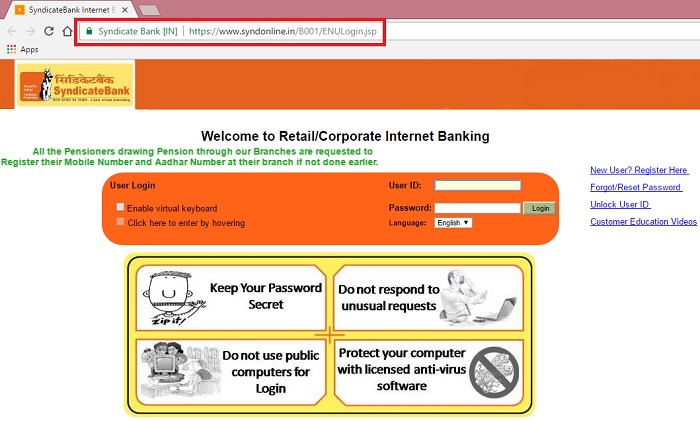
The following services are available under Syndicate Bank login:
- Balance enquiry
- Fund transfer between different accounts
- IMPS- Inter bank Mobile Payment Service
- Inter Bank funds transfer through NEFT
- Fund transfer to third parties within the Bank
- Issue of new cheque book
- Cheque status enquiry
- Stop payment
- Gold price and ATM Locator
- Check and Maitain the information on Loans
1. Application Form for Internet Banking
Click here to download Application form for internet banking
2. Guidelines for Syndicate Bank Login
You have to browse the home page of our website www.syndicatebank.in. From
there, click on “Internet Banking Login” link. All you need to access the
Internet Banking facility are
(a) Your customer ID
(b) Your log in password and
(c) Your transaction password.
Your customer ID is given on top of this brochure. The passwords will be
separately given to you by your branch. You need to remember the passwords
always for security reasons. We suggest you don‟t even note them down
anywhere! The passwords are changeable after first use or login.
3. Syndicate Bank Internet Banking Help
For Customer Care, please get in touch with us at syndinet@syndicatebank.co.in or call on our toll free number 1800-425-5784
4. Syndicate Bank Mobile Login
Syndicate bank has not designed mobile login for smart phone users, as soon as customer logs in from their mobile, it directs to desktop screen. there is a new designed facility for mobile users is Syndicatebank app. By Installing App, users can login and use the features like fund transfers, balance enquiry, check stauses.
