
Home > Corporationbank > Corporation Bank Login: Net Banking
Customers can check to login to Corporation bank using newly designed website to view transactions for deposits and fund transfers. Customers can view their account tansactions and make funds transfer through Login System. Corporation bank net banking online registration : Customers need to fill net banking online registration form
How to apply net banking online?
The Internet Banking for Corporation Bank called "CorpNet".
- Personal Banking for Individuals
- Corporate Banking for Corporates
- Cash Management Services for the Customers

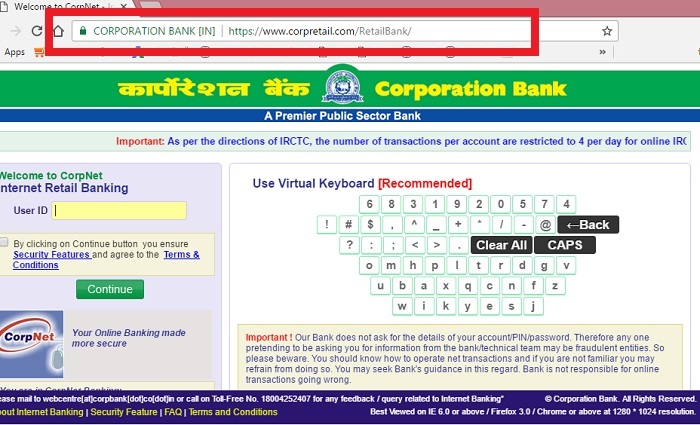
Once you click the login button you should able to see www.corpretail.com with the below screen, check the secured Lock Mark in Green Color.
The following services are available under Corporation net banking:
- Balance enquiry
- Last 5 transaction
- Fund transfer between own accounts
- IMPS- Inter bank Mobile Payment Service
- Inter Bank funds transfer through NEFT
- Fund transfer to third parties within the Bank
- Issue of new cheque book
- Cheque status enquiry
- Stop payment
- Gold price and ATM Locator
- Changing the primary account and change MPIN
1. Corporation Net Banking Registration
the Internet Banking Solution from Corporation Bank, Corpnet. To Register Net Banking service, Customers need to fill the Internet Banking form available at the bank branch office, the form needs to fill with Name of the Account Holder, Account Number and Address and with the details of Details of the Mobile No. /E Mail ID for sending OTP for sending alert messages to the respective Corporation Bank. Corporation Net Banking Registration comes in three type of Account information:
- Personal Banking for Individuals
- Corporate Banking for Corporates or Business
- Download the CorpNet application form from our website http://www.corpbank.com
- Fill the above detailed information and Sign it and send it to your branch.
- Upon Verifying your account details and signature, your application is forwarded to Bangalore Web Center
- The web center will create your user-id and password and mailed userid to you and password to the branch office.
- Once you visit your branch office you can login with userid and password
2. Corporation Bank Mobile Net Banking
Customers can access directly from your smart phone by checking Corpbank Mobile login. The Screen is still a desktop version for mobile netbanking.
3. Corpbank Login Problems
Customers need to log a call in the branch if you have problem in logging with userid and password.
Alternatively customers can mail to webcentre@corpbank.co.in, explaining the type of the problem occurs.
Customer Care Number : 1800 425 2407
4. Corpbank IMPS
IMPS Funds Transfer offers an instant, 24X7 hours facility from the corporation bannk for electronic fund transfer service from one account to another account.
1. IMPS funds transfer – Person to Person(P2P) Using Mobile Number and MMID
2. IMPS funds transfer – Person to Person(P2P) Using IFSC and Account Number
3. IMPS Merchant payment– Person to Merchant(P2M)
IMPS Funds Transfer facilitate corpbank customers to use smartphones for accessing their bank accounts and create interbank fund transfers in a secured manner with immediate confirmation features with small charge of fee as per the value of transfer.
